Transaction Protection for Institutions
Transaction screening and monitoring for protected wallets
CoinCover protects your wallets and workspaces by actively monitoring and validating outgoing transaction events.
During various transaction stages, we’ll promptly notify you that a transaction is protected by CoinCover or of any potential threats and suspicious activity, ensuring robust protection at all times.
Integration methods
-
Screening and monitoring API: Use our API to directly send transaction details and receive responses within milliseconds. This allows for real-time monitoring and immediate feedback on each transaction’s protected status.
-
Partner connections guide: Implement event-based monitoring by configuring webhooks with your preferred wallet service provider. Our guides include specific setup instructions for:
-
Bitgo
-
Fireblocks
-
ForDeFi
-
Getting started
In order to integrate CoinCover’s Transaction Protection for Institutions, follow these steps:
-
Set up authentication tokens
-
Register users
-
Integrate transaction check
-
Configure partner connections
Set up Authentication Tokens
To use CoinCover’s services, a bearer token is required. These are unique for TEST and PROD environments. A TEST token can be requested from our Sales team and a PROD token is supplied once contractual agreements have been made and the test configuration has been validated by our Sales Engineering team.
Endpoints
TEST
PRODUCTION
Register users
CoinCover requires users existing within a partner’s systems to be registered with essential user details.
The partner acknowledges the contractual declarations that any user details provided have been verified via suitable KYC practices and that 2FA is active on an account.
Integrate transaction checker
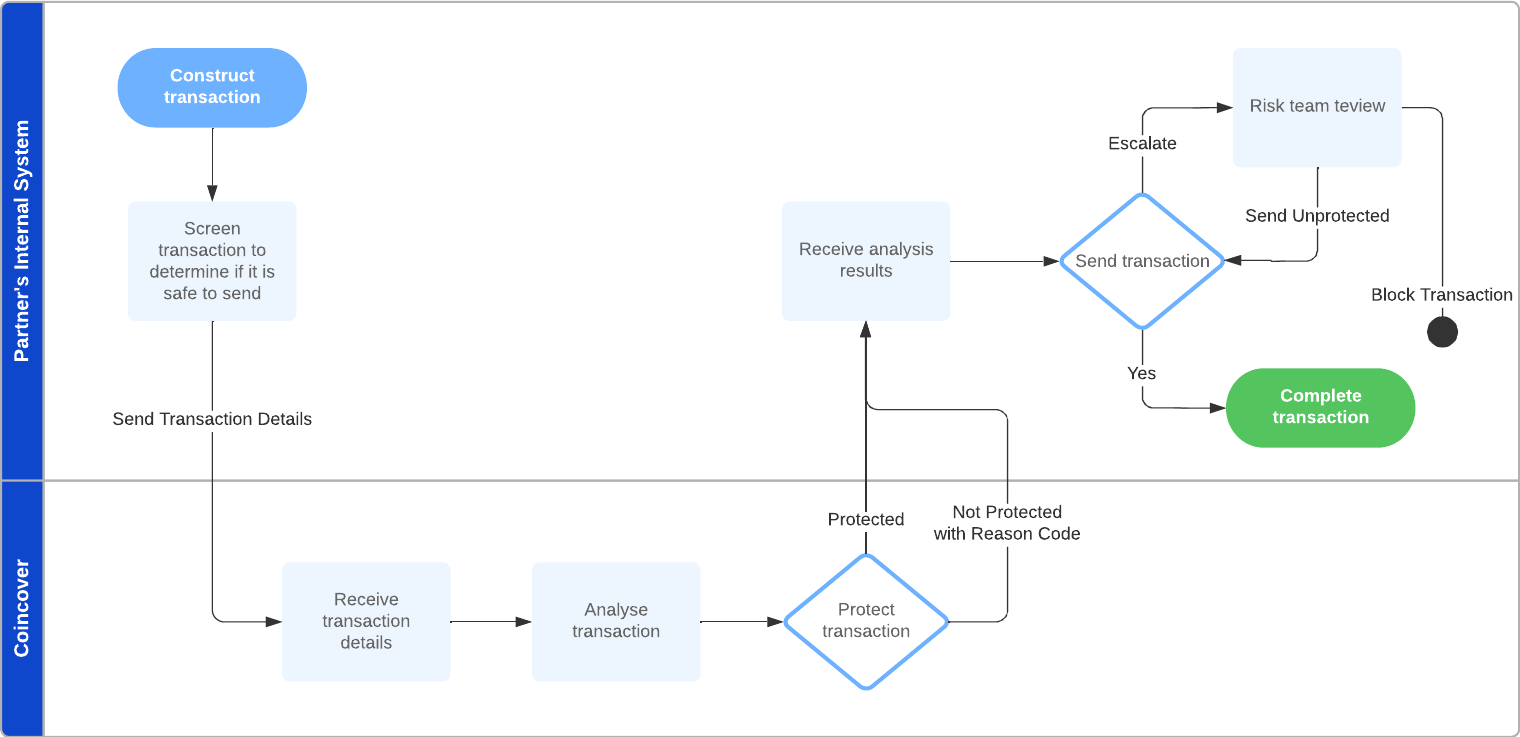
CoinCover needs to analyse transactions before they are sent to the blockchain.
For each transaction analysed, CoinCover will provide a response indicating whether the transaction is protected by CoinCover or not.
'Not protected' responses will contain the relevant reason code and description.
Configure partner connections
CoinCover requires relevant partner platforms to be configured with read-only access to completed transactions.
This is required to train machine learning models, monitor wallet activity to detect suspicious patterns and reconcile any real-time transaction protection decisions with the completed transactions.
Follow the steps listed for the relevant platforms under the Partner Connections section.
User Management
Overview
This section contains APIs that are used to create and manage user registrations.
POST Create new user
{{HOST}}/userCreate new user is used to create a new User Registration for an existing User within a partner’s systems. The User Id that is associated with user in the partner’s systems should be specified in the request body along with the relevant user details as stated in the Field Information table.
Field Information
| Field | Description | Mandatory |
|---|---|---|
|
User Id of the partner’s end-user relevant to the partners systems. |
Yes |
|
First name. |
Yes |
|
Last name. |
Yes |
|
Date of Birth. |
No |
|
Country of residence of end-user https://www.iso.org/obp/ui/#search for supported format. |
Yes |
|
Nationality of end-user https://www.iso.org/obp/ui/#search for supported format. |
No |
Response Codes
| Code | Description |
|---|---|
201 |
Created successfully. |
400 |
Missing mandatory field value or validation issues. |
401 |
Missing or invalid bearer token. |
HEADERS
Content-Type application/json
Authorization Bearer ${API_TOKEN}
Body raw (json)
{
    "userId": "jb001",
    "firstName": "Joe",
    "lastName": "Blogs",
    "dob": "1975-05-01",
    "residenceCountry": "US",
    "nationality": "US"
}
Example Request
cURL - cURL
curl --location 'https://api.txm.coincover.com/user' \
--header 'Content-Type: application/json' \
--header 'Authorization: Bearer ${API_TOKEN}' \
--data '{
    "userId": "jb001",
    "firstName": "Joe",
    "lastName": "Blogs",
    "dob": "1975-05-01",
    "residenceCountry": "US",
    "nationality": "US"
}'
C# - HttpClient
var client = new HttpClient();
var request = new HttpRequestMessage(HttpMethod.Post, "https://api.txm.coincover.com/user");
request.Headers.Add("Authorization", "Bearer ${API_TOKEN}");
var content = new StringContent("{\n    \"userId\": \"jb001\",\n    \"firstName\": \"Joe\",\n    \"lastName\": \"Blogs\",\n    \"dob\": \"1975-05-01\",\n    \"residenceCountry\": \"US\",\n    \"nationality\": \"US\"\n}", null, "application/json");
request.Content = content;
var response = await client.SendAsync(request);
response.EnsureSuccessStatusCode();
Console.WriteLine(await response.Content.ReadAsStringAsync());
Go - Native
package main

import (
  "fmt"
  "strings"
  "net/http"
  "io/ioutil"
)

func main() {

  url := "https://api.txm.coincover.com/user"
  method := "POST"

  payload := strings.NewReader(`{
    "userId": "jb001",
    "firstName": "Joe",
    "lastName": "Blogs",
    "dob": "1975-05-01",
    "residenceCountry": "US",
    "nationality": "US"
  }`)

  client := &http.Client {
  }
  req, err := http.NewRequest(method, url, payload)

  if err != nil {
    fmt.Println(err)
    return
  }
  req.Header.Add("Content-Type", "application/json")
  req.Header.Add("Authorization", "Bearer ${API_TOKEN}")

  res, err := client.Do(req)
  if err != nil {
    fmt.Println(err)
    return
  }
  defer res.Body.Close()

  body, err := ioutil.ReadAll(res.Body)
  if err != nil {
    fmt.Println(err)
    return
  }
  fmt.Println(string(body))
}
JavaScript - Fetch
var myHeaders = new Headers();
myHeaders.append("Content-Type", "application/json");
myHeaders.append("Authorization", "Bearer ${API_TOKEN}");

var raw = JSON.stringify({
  "userId": "jb001",
  "firstName": "Joe",
  "lastName": "Blogs",
  "dob": "1975-05-01",
  "residenceCountry": "US",
  "nationality": "US"
});

var requestOptions = {
  method: 'POST',
  headers: myHeaders,
  body: raw,
  redirect: 'follow'
};

fetch("https://api.txm.coincover.com/user", requestOptions)
  .then(response => response.text())
  .then(result => console.log(result))
  .catch(error => console.log('error', error));
Example Response
            No response body
This request doesn't return any response body
PATCH Update Existing User
/user/${userId}Field Information
| Field | Description | Mandatory |
|---|---|---|
|
First name. |
No |
|
Last name. |
No |
|
Country of residence of end-user https://www.iso.org/obp/ui/#search for supported format. |
No |
|
Date of Birth. |
No |
Response Codes
| Code | Description |
|---|---|
204 |
Successfully updated. |
400 |
Missing mandatory field value or validation issues. |
401 |
Missing or invalid bearer token. |
404 |
User with the specified id does not exist. |
HEADERS
Content-Type application/json
Authorization Bearer ${API_TOKEN}
Body raw
{
    "firstName": "Joe",
    "lastName": "Blogs",
    "residenceCountry": "US"
}
Example Request
cURL - cURL
curl --location --request PATCH 'https://api.txm.coincover.com/user/jb001' \
--header 'Content-Type: application/json' \
--header 'Authorization: Bearer ${API_TOKEN}' \
--data '{
    "firstName": "Joe",
    "lastName": "Blogs",
    "residenceCountry": "US"
}'
C# - HttpClient
var client = new HttpClient();
var request = new HttpRequestMessage(HttpMethod.Patch, "https://api.txm.coincover.com/user/jb001");
request.Headers.Add("Authorization", "Bearer ${API_TOKEN}");
var content = new StringContent("{\n    \"firstName\": \"Joe\",\n    \"lastName\": \"Blogs\",\n    \"residenceCountry\": \"US\"\n}", null, "application/json");
request.Content = content;
var response = await client.SendAsync(request);
response.EnsureSuccessStatusCode();
Console.WriteLine(await response.Content.ReadAsStringAsync());
Go - Native
package main

import (
  "fmt"
  "strings"
  "net/http"
  "io/ioutil"
)

func main() {

  url := "https://api.txm.coincover.com/user/jb001"
  method := "PATCH"

  payload := strings.NewReader(`{
    "firstName": "Joe",
    "lastName": "Blogs",
    "residenceCountry": "US"
  }`)

  client := &http.Client {
  }
  req, err := http.NewRequest(method, url, payload)

  if err != nil {
    fmt.Println(err)
    return
  }
  req.Header.Add("Content-Type", "application/json")
  req.Header.Add("Authorization", "Bearer ${API_TOKEN}")

  res, err := client.Do(req)
  if err != nil {
    fmt.Println(err)
    return
  }
  defer res.Body.Close()

  body, err := ioutil.ReadAll(res.Body)
  if err != nil {
    fmt.Println(err)
    return
  }
  fmt.Println(string(body))
}
JavaScript - Fetch
var myHeaders = new Headers();
myHeaders.append("Content-Type", "application/json");
myHeaders.append("Authorization", "Bearer ${API_TOKEN}");

var raw = JSON.stringify({
  "firstName": "Joe",
  "lastName": "Blogs",
  "residenceCountry": "US"
});

var requestOptions = {
  method: 'PATCH',
  headers: myHeaders,
  body: raw,
  redirect: 'follow'
};

fetch("https://api.txm.coincover.com/user/jb001", requestOptions)
  .then(response => response.text())
  .then(result => console.log(result))
  .catch(error => console.log('error', error));
Example Response
            No response body
This request doesn't return any response body
Business management
Overview
This section contains APIs that are used to create and manage user registrations.
POST Create new business user
/businessCreate new user is used to create a new User Registration for an existing User within a partner’s systems. The User Id that is associated with user in the partner’s systems should be specified in the request body along with the relevant user details as stated in the Field Information table.
Field Information
| Field | Description | Mandatory |
|---|---|---|
|
User Id of the partner’s business user relevant to the partners systems. |
Yes |
|
Name of the business. |
Yes |
|
Address. |
Yes |
|
Registration Number. |
No |
|
Name of the contact person for the business. |
Yes |
|
Email of the contact person for the business. |
Yes |
|
Phone number of the contact person for the business. |
No |
Response Codes
| Code | Description |
|---|---|
201 |
Created successfully. |
400 |
Missing mandatory field value or validation issues. |
401 |
Missing or invalid bearer token. |
HEADERS
Content-Type application/json
Authorization Bearer ${API_TOKEN}
Body raw (json)
{
    "businessId": "jb001",
    "name": "Company Name",
    "address": "13 Gerrard St",
    "registrationNumber": "12345-6789",
    "contactPersonName": "Joe Blogs",
    "contactPersonEmail": "joe@company.com",
    "contactPersonPhone": "+447822000000"
}
Example Request
cURL - cURL
curl --location 'https://api.txm.coincover.com/business' \
--header 'Content-Type: application/json' \
--header 'Authorization: Bearer ${API_TOKEN}' \
--data-raw '{
    "businessId": "jb001",
    "name": "Company Name",
    "address": "13 Gerrard St",
    "registrationNumber": "12345-6789",
    "contactPersonName": "Joe Blogs",
    "contactPersonEmail": "joe@company.com",
    "contactPersonPhone": "+447822000000"
}'
C# - HttpClient
var client = new HttpClient();
var request = new HttpRequestMessage(HttpMethod.Post, "https://api.txm.coincover.com/business");
request.Headers.Add("Authorization", "Bearer ${API_TOKEN}");
var content = new StringContent("{\n    \"businessId\": \"jb001\",\n    \"name\": \"Company Name\",\n    \"address\": \"13 Gerrard St\",\n    \"registrationNumber\": \"12345-6789\",\n    \"contactPersonName\": \"Joe Blogs\",\n    \"contactPersonEmail\": \"joe@company.com\",\n    \"contactPersonPhone\": \"+447822000000\"\n}", null, "application/json");
request.Content = content;
var response = await client.SendAsync(request);
response.EnsureSuccessStatusCode();
Console.WriteLine(await response.Content.ReadAsStringAsync());
Go - Native
package main

import (
  "fmt"
  "strings"
  "net/http"
  "io/ioutil"
)

func main() {

  url := "https://api.txm.coincover.com/business"
  method := "POST"

  payload := strings.NewReader(`{
    "businessId": "jb001",
    "name": "Company Name",
    "address": "13 Gerrard St",
    "registrationNumber": "12345-6789",
    "contactPersonName": "Joe Blogs",
    "contactPersonEmail": "joe@company.com",
    "contactPersonPhone": "+447822000000"
  }`)

  client := &http.Client {
  }
  req, err := http.NewRequest(method, url, payload)

  if err != nil {
    fmt.Println(err)
    return
  }
  req.Header.Add("Content-Type", "application/json")
  req.Header.Add("Authorization", "Bearer ${API_TOKEN}")

  res, err := client.Do(req)
  if err != nil {
    fmt.Println(err)
    return
  }
  defer res.Body.Close()

  body, err := ioutil.ReadAll(res.Body)
  if err != nil {
    fmt.Println(err)
    return
  }
  fmt.Println(string(body))
}
JavaScript - Fetch
var myHeaders = new Headers();
myHeaders.append("Content-Type", "application/json");
myHeaders.append("Authorization", "Bearer ${API_TOKEN}");

var raw = JSON.stringify({
  "businessId": "jb001",
  "name": "Company Name",
  "address": "13 Gerrard St",
  "registrationNumber": "12345-6789",
  "contactPersonName": "Joe Blogs",
  "contactPersonEmail": "joe@company.com",
  "contactPersonPhone": "+447822000000"
});

var requestOptions = {
  method: 'POST',
  headers: myHeaders,
  body: raw,
  redirect: 'follow'
};

fetch("https://api.txm.coincover.com/business", requestOptions)
  .then(response => response.text())
  .then(result => console.log(result))
  .catch(error => console.log('error', error));
Example Response
            No response body
This request doesn't return any response body
PATCH Update existing business user
/business/${businessId}Field Information
| Field | Description | Mandatory |
|---|---|---|
|
Name of the business. |
No |
|
Address. |
No |
|
Registration Number. |
No |
|
Name of the contact person for the business. |
No |
|
Email of the contact person for the business. |
No |
|
Phone number of the contact person for the business. |
No |
Response Codes
| Code | Description |
|---|---|
204 |
Successfully updated. |
400 |
Missing mandatory field value or validation issues. |
401 |
Missing or invalid bearer token. |
404 |
User with the specified id does not exist. |
HEADERS
Content-Type application/json
Authorization Bearer ${API_TOKEN}
Body raw
{
    "name": "Company Name",
    "address": "72 Horseferry Rd",
    "registrationNumber": "12345-6789",
    "contactPersonName": "Joe Blogs",
    "contactPersonEmail": "joe@company.com",
    "contactPersonPhone": "+447822000000"
}
Example Request
cURL - cURL
curl --location -g --request PATCH 'https://api.txm.coincover.com/business/${businessId}' \
--header 'Content-Type: application/json' \
--header 'Authorization: Bearer ${API_TOKEN}' \
--data-raw '{
    "name": "Company Name",
    "address": "72 Horseferry Rd",
    "registrationNumber": "12345-6789",
    "contactPersonName": "Joe Blogs",
    "contactPersonEmail": "joe@company.com",
    "contactPersonPhone": "+447822000000"
}'
C# - HttpClient
var client = new HttpClient();
var request = new HttpRequestMessage(HttpMethod.Patch, "https://api.txm.coincover.com/business/${businessId}");
request.Headers.Add("Authorization", "Bearer ${API_TOKEN}");
var content = new StringContent("{\n    \"name\": \"Company Name\",\n    \"address\": \"72 Horseferry Rd\",\n    \"registrationNumber\": \"12345-6789\",\n    \"contactPersonName\": \"Joe Blogs\",\n    \"contactPersonEmail\": \"joe@company.com\",\n    \"contactPersonPhone\": \"+447822000000\"\n}", null, "application/json");
request.Content = content;
var response = await client.SendAsync(request);
response.EnsureSuccessStatusCode();
Console.WriteLine(await response.Content.ReadAsStringAsync());
Go - Native
package main

import (
  "fmt"
  "strings"
  "net/http"
  "io/ioutil"
)

func main() {

  url := "https://api.txm.coincover.com/business/$%7BbusinessId%7D"
  method := "PATCH"

  payload := strings.NewReader(`{
    "name": "Company Name",
    "address": "72 Horseferry Rd",
    "registrationNumber": "12345-6789",
    "contactPersonName": "Joe Blogs",
    "contactPersonEmail": "joe@company.com",
    "contactPersonPhone": "+447822000000"
  }`)

  client := &http.Client {
  }
  req, err := http.NewRequest(method, url, payload)

  if err != nil {
    fmt.Println(err)
    return
  }
  req.Header.Add("Content-Type", "application/json")
  req.Header.Add("Authorization", "Bearer ${API_TOKEN}")

  res, err := client.Do(req)
  if err != nil {
    fmt.Println(err)
    return
  }
  defer res.Body.Close()

  body, err := ioutil.ReadAll(res.Body)
  if err != nil {
    fmt.Println(err)
    return
  }
  fmt.Println(string(body))
}
JavaScript - Fetch
var myHeaders = new Headers();
myHeaders.append("Content-Type", "application/json");
myHeaders.append("Authorization", "Bearer ${API_TOKEN}");

var raw = JSON.stringify({
  "name": "Company Name",
  "address": "72 Horseferry Rd",
  "registrationNumber": "12345-6789",
  "contactPersonName": "Joe Blogs",
  "contactPersonEmail": "joe@company.com",
  "contactPersonPhone": "+447822000000"
});

var requestOptions = {
  method: 'PATCH',
  headers: myHeaders,
  body: raw,
  redirect: 'follow'
};

fetch("https://api.txm.coincover.com/business/${businessId}", requestOptions)
  .then(response => response.text())
  .then(result => console.log(result))
  .catch(error => console.log('error', error));
Example Response
            No response body
This request doesn't return any response body
Transaction Check
Transactions should be sent to the Risk Engine before they are broadcast to the blockchain.
For each transaction checked, CoinCover will provide a response indicating whether the transaction is 'Green' (protected by CoinCover) or 'Red' (not protected by CoinCover). 'Red' responses will contain the relevant reason code and description.
| Code | Category | Reason |
|---|---|---|
50101 |
Sanctioned address |
The destination wallet address is associated with an untrustworthy or high-risk jurisdiction. |
50102 |
Scamming address |
The destination wallet address has previously been associated with reported scam. |
50103 |
Phishing address |
The destination wallet address has previously been associated with reported phishing activities |
50104 |
Previous claim |
The destination wallet address has previously been associated with a previous claim incident. |
50105 |
Honeypot token |
The destination wallet address has previously been associated with honeypot tokens or has created scam tokens. |
50106 |
Blackmail activities |
The destination wallet address has previously been associated with blackmail activities. |
50107 |
Stealing attack |
The destination wallet address has previously been associated with a reported stealing attack. |
50108 |
Fake KYC |
The destination wallet address has previously been involved with faking KYC requirements. |
50109 |
Malicious mining activities |
The destination wallet address has previously been involved with malicious mining activities. |
50110 |
Darkweb transactions |
The destination wallet address has previously been involved with darkweb transactions. |
50111 |
Cybercrime |
The destination wallet address has previously been involved with cybercrime activities. |
50112 |
Money laundering |
The destination wallet address has previously been involved with money laundering activities. |
50113 |
Financial crime |
The destination wallet address has previously been involved with financial crime activities. |
50114 |
Sextortion |
The destination wallet address has previously been involved with sextortion activities. |
50115 |
Ransomware |
The destination wallet address has previously been involved with ransomware attacks. |
50201 |
Associated with blocklist wallet |
The destination wallet address has previously transacted with known blocklisted addresses. |
50202 |
Suspected malicious address |
The destination wallet address is suspected to be involved with malicious behaviour. |
50301 |
User upper amount hourly limit |
The transaction amount breaches the user’s maximum amount per hour limit policy. |
50302 |
User upper amount daily limit |
The transaction amount breaches the user’s maximum amount per day limit policy. |
50303 |
Organisation transaction upper amount limit |
The transaction amount breaches the maximum amount per transaction limit policy. |
50304 |
Wallet hourly upper amount limit |
The transaction amount breaches the maximum amount per hour for this wallet. |
50305 |
Wallet daily upper amount limit |
The transaction amount breaches the maximum amount per day for this wallet. |
50306 |
Organisation hourly upper amount limit |
The transaction amount breaches the maximum amount per hour for your organisation. |
50307 |
Organisation daily upper amount limit |
The transaction amount breaches the maximum amount per day for your organisation. |
50308 |
Organisation transactions limit (per user) |
The transaction breaches the maximum number of transactions allowed per day for your organisation. |
50310 |
User transaction upper amount limit |
This transaction amount breaches the maximum claim limit amount for this user. |
50401 |
User upper limit |
This transaction amount breaches CoinCover’s user limit policy. |
50402 |
Transaction amount daily limit |
This transaction amount breaches CoinCover’s daily limit policy. |
50403 |
Transaction upper amount limit |
The transaction amount breaches CoinCover’s maximum amount per transaction limit. |
50501 |
Anomalous daily transaction |
This transaction has been determined as being suspicious in conjunction with the daily pattern. |
50502 |
Anomalous weekly transaction |
This transaction has been determined as being suspicious in conjunction with the weekly pattern. |
50503 |
Anomalous monthly transaction |
This transaction has been determined as being suspicious in conjunction with the monthly pattern. |
50504 |
Anomalous quarterly transaction |
This transaction has been determined as being suspicious in conjunction with the quarterly pattern. |
50505 |
Anomalous yearly transaction |
This transaction has been determined as being suspicious in conjunction with the yearly pattern. |
50601 |
Transaction is in a time window with abnormal volume |
This transaction has been determined as being suspicious in conjunction with time of day. |
50602 |
Transaction is in a time window with abnormal volume |
This transaction has been determined as being suspicious in conjunction weekly behaviour. |
50603 |
Transaction is in a time window with abnormal volume |
This transaction has been determined as being suspicious in conjunction monthly behaviour. |
50701 |
Token not supported by CoinCover |
This transaction contains a token that is not protected by CoinCover. |
POST Check Transaction
{{HOST}}/transactionTransactions should be sent to CoinCover before they are published or broadcast to the blockchain. CoinCover requires core elements of a blockchain transaction including the transaction Hash1 which allows CoinCover to reconcile this for any published transactions.
1For Fireblocks customers who are unable to provide a transaction Hash, a unique reference for the transaction can be submitted in place of the transaction Hash, from the /v1/transaction
Transactions need to be associated to a wallet and an end-user.
1For Fireblocks customers who need to provide a walletId, the tuple of the vaultId and assetId can be provided as the walletId in the form of ${vaultId}-${assetId} (please see the Fireblocks Field Information table). The chain and coin/token type needs to be defined.
Note that tokens must be supported contractually and the list of token names can be found at:
https://www.coingecko.com/en/api/documentation
Field Information
| Field | Description | Mandatory |
|---|---|---|
transactionCustomerId |
Unique internal ID used by customers systems to identify a transaction. |
Yes |
transactionHash |
Hash of the transaction, verifiable on chain if published. |
No |
coin |
Name of coin/token as defined in coingecko. Use name and not code. E.g bitcoin not btc as codes are not unique. |
Yes |
walletId |
walletId associated to the user. Where there is an onchain reference available, this should be used. |
Yes |
outputs |
Array to support single or batch transactions. Each object in the array should consist of a destination address, amount and the associated user. |
Yes |
outputs: destination |
On chain destination address. |
Yes |
outputs: amount |
Amount in currency. E.g. 1.7 bitcoin. |
Yes |
outputs: userId |
User ID of the end-user relevant to the customers systems and associated to each output address. |
Yes |
Fireblocks Field Information
Only applicable to customers who have assets on Fireblocks.
| Fireblocks Field | CoinCover Field | Description | Mandatory |
|---|---|---|---|
externalTxId |
transactionCustomerId |
Unique transaction ID provided by the user. Future transactions with same ID will be rejected. |
Yes |
vaultId-assetId |
walletId |
The tuple of the vaultId and assetId should be provided as the walletId in the form of ${vaultId}-${assetId}. |
Yes |
HTTP Status Codes
| Code | Description |
|---|---|
200 |
OK. |
400 |
Missing mandatory field value or validation issues. |
401 |
Missing or invalid bearer token. |
HEADERS
Content-Type application/json
Authorization Bearer ${API_TOKEN}
Body raw
{
  "transactionCustomerId": "b27f38b9-5158-4b4b-ae2f-a030852f98cd",
  "transactionHash": "GL8636339870050078",
  "coin": "bitcoin-cash",
  "walletId": "1FjgpyeeWTRd7BxTXHEL2rjCj8",
  "outputs":[
      {
        "destination": "16bG5v7VkCeadwzyD1CqAvL6soJ3nfGAhh",
        "amount": "356",
        "userId": "27a73667-fb36-4708-822f-8b2c79cb817e"
      }
  ]
}
Example Request
cURL - cURL
curl --location '/transaction' \
--header 'Content-Type: application/json' \
--header 'Authorization: Bearer ${API_TOKEN}' \
--data '{
  "transactionCustomerId": "b27f38b9-5158-4b4b-ae2f-a030852f98cd",
  "transactionHash": "GL8636339870050078",
  "coin": "bitcoin-cash",
  "walletId": "1FjgpyeeWTRd7BxTXHEL2rjCj8",
  "outputs":[
      {
      "destination": "16bG5v7VkCeadwzyD1CqAvL6soJ3nfGAhh",
      "amount": "356",
      "userId": "27a73667-fb36-4708-822f-8b2c79cb817e"
      }
  ]
}'
C# - HttpClient
var client = new HttpClient();
var request = new HttpRequestMessage(HttpMethod.Post, "/transaction");
request.Headers.Add("Authorization", "Bearer ${API_TOKEN}");
var content = new StringContent("{\n  \"transactionCustomerId\": \"b27f38b9-5158-4b4b-ae2f-a030852f98cd\",\n  \"transactionHash\": \"GL8636339870050078\",\n  \"coin\": \"bitcoin-cash\",\n  \"walletId\": \"1FjgpyeeWTRd7BxTXHEL2rjCj8\",\n  \"outputs\":[\n     {\n       \"destination\": \"16bG5v7VkCeadwzyD1CqAvL6soJ3nfGAhh\",\n       \"amount\": \"356\",\n       \"userId\": \"27a73667-fb36-4708-822f-8b2c79cb817e\"\n     }\n   ]\n}", null, "application/json");
request.Content = content;
var response = await client.SendAsync(request);
response.EnsureSuccessStatusCode();
Console.WriteLine(await response.Content.ReadAsStringAsync());
Go - Native
package main

import (
  "fmt"
  "strings"
  "net/http"
  "io/ioutil"
)

func main() {

  url := "/transaction"
  method := "POST"

  payload := strings.NewReader(`{
  "transactionCustomerId": "b27f38b9-5158-4b4b-ae2f-a030852f98cd",
  "transactionHash": "GL8636339870050078",
  "coin": "bitcoin-cash",
  "walletId": "1FjgpyeeWTRd7BxTXHEL2rjCj8",
  "outputs":[
    {
      "destination": "16bG5v7VkCeadwzyD1CqAvL6soJ3nfGAhh",
      "amount": "356",
      "userId": "27a73667-fb36-4708-822f-8b2c79cb817e"
    }
  ]
  }`)

  client := &http.Client {
  }
  req, err := http.NewRequest(method, url, payload)

  if err != nil {
    fmt.Println(err)
    return
  }
  req.Header.Add("Content-Type", "application/json")
  req.Header.Add("Authorization", "Bearer ${API_TOKEN}")

  res, err := client.Do(req)
  if err != nil {
    fmt.Println(err)
    return
  }
  defer res.Body.Close()

  body, err := ioutil.ReadAll(res.Body)
  if err != nil {
    fmt.Println(err)
    return
  }
  fmt.Println(string(body))
}
JavaScript - Fetch
var myHeaders = new Headers();
myHeaders.append("Content-Type", "application/json");
myHeaders.append("Authorization", "Bearer ${API_TOKEN}");

var raw = JSON.stringify({
  "transactionCustomerId": "b27f38b9-5158-4b4b-ae2f-a030852f98cd",
  "transactionHash": "GL8636339870050078",
  "coin": "bitcoin-cash",
  "walletId": "1FjgpyeeWTRd7BxTXHEL2rjCj8",
  "outputs": [
    {
      "destination": "16bG5v7VkCeadwzyD1CqAvL6soJ3nfGAhh",
      "amount": "356",
      "userId": "27a73667-fb36-4708-822f-8b2c79cb817e"
    }
  ]
});

var requestOptions = {
  method: 'POST',
  headers: myHeaders,
  body: raw,
  redirect: 'follow'
};

fetch("/transaction", requestOptions)
  .then(response => response.text())
  .then(result => console.log(result))
  .catch(error => console.log('error', error));
Example Response
{
  "transactionUUID": "3d0ee9d3-4d85-5c8e-af77-3bc9feec83f2",
  "status": "GREEN",
  "message": "Transaction is protected by CoinCover."
}