Transaction Protection for Consumers
Transaction protection for your users
CoinCover protects your users by actively monitoring and validating outgoing transactions pre-broadcast against CoinCover’s risk engine. The risk engine is an advanced, multi-layered screening solution that evaluates blockchain transactions in real-time to identify, flag and notify users when something is suspicious.
CoinCover’s risk engine provides a binary response of ‘Red’ or ‘Green’ to indicate if a transaction appears either malicious or safe to send, respectively. If the risk engine fails to meet the service description, then the customer may make a claim against the CoinCover guarantee.
If a transaction is marked as ‘Red’ we will provide you with the reason for this decision and the description of this reason in the API response.
CoinCover’s risk engine is an API-native solution. This allows you to integrate the solution directly into your UI/UX, ensuring that the solution fits with your branding and desired user experience.
If you would like to test the functionality of the Transaction Check API, please contact your Sales Rep, who will set up a test account for you.
Integration Guides
CoinCover’s Transaction Protection for consumers is an API-first product that provides the foundational building blocks of Protection. You can tailor the components you need to create a solution that best suits your business.
Please find below guides for the most common use cases of our Product:
Authentication
All our endpoints require authentication to be accessed. This guide explains the entire authentication process, helping you securely connect to our platform.
Protection Per Transaction
Learn how to integrate our Protection product so that CoinCover can protect your end-user withdrawals. This guide walks you through the necessary steps to enable Protection for each transaction.
Subscription for Protection
Discover how to incorporate our Protection feature into a subscription model, allowing an account to be fully covered by CoinCover. This guide outlines the process for setting up Protection subscriptions and Protecting the account.
Authentication
Set up Authentication Tokens
To use CoinCover’s services, a bearer token is required. These are unique for TEST and PROD environments.
To test within the Sandbox environment, a TEST token will be provided by your Account Manager.
Once contractual agreements have been made and the test configuration has been validated a PROD token will be supplied.
Endpoints
TEST
PRODUCTION
Protection per Transaction
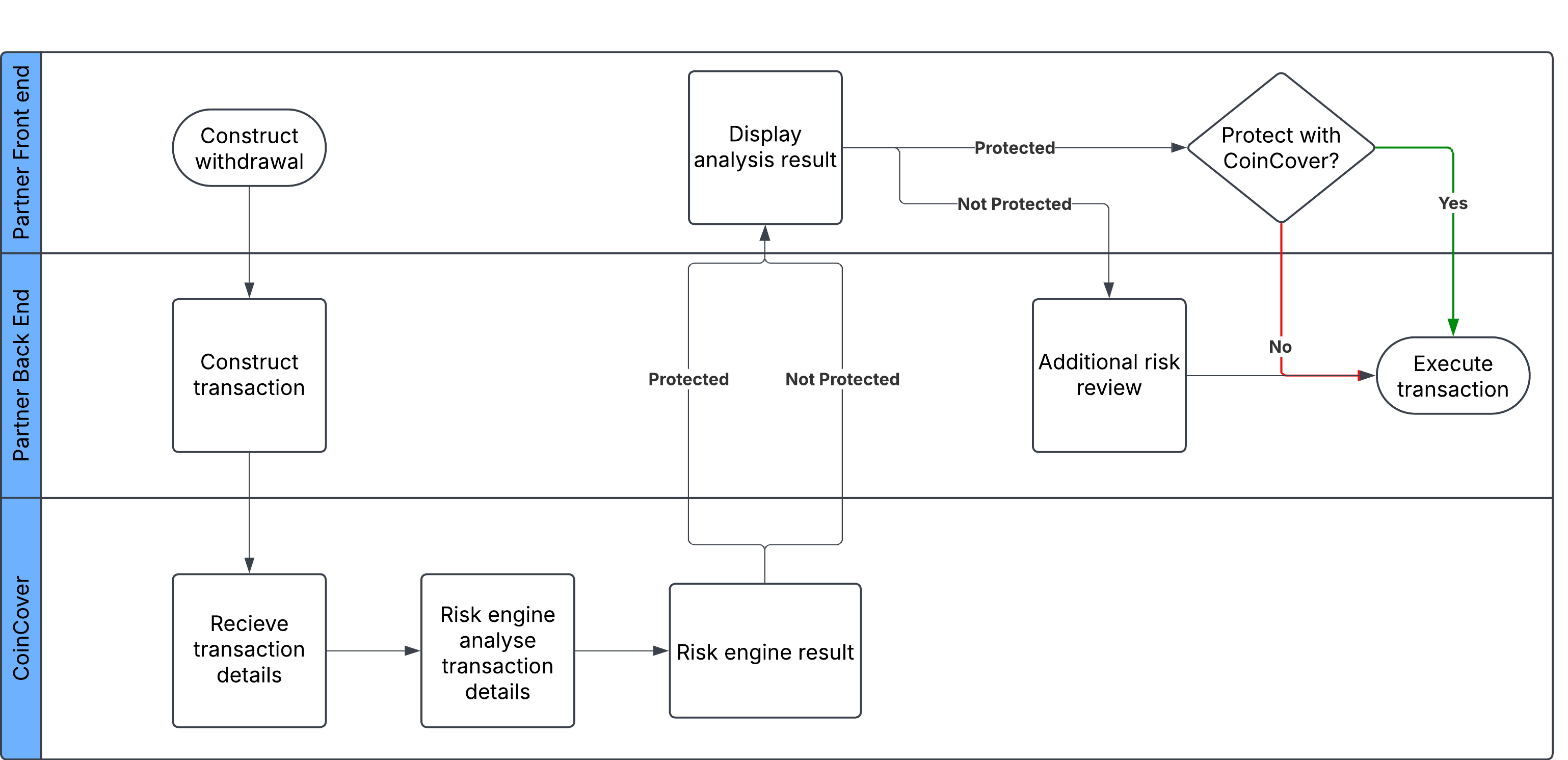
This flow allows for every signed up customer on your platform to gain the peace of mind that comes with CoinCover protection.
CoinCover’s Protection Workflow Diagram:
Integration Guide
Step 1: Integrate Transaction Check endpoint
After a user on your platform creates a transaction, you will send the necessary data to the ‘/Transaction’ API endpoint link here. This returns either a Green (Protected) or Red (Not Protected) status for that specific transaction.
-
Green: Provide the user with the option to purchase Protection.
-
Red: We recommend advising the customer and carrying out an additional risk review.
Subscription for Protection
This flow is for organisations that want CoinCover Protection to be part of a subscription model.
As part of the subscription, customers pay the partner, enabling them to benefit from CoinCover Protection on all of their transactions.
Step 1: User Registration
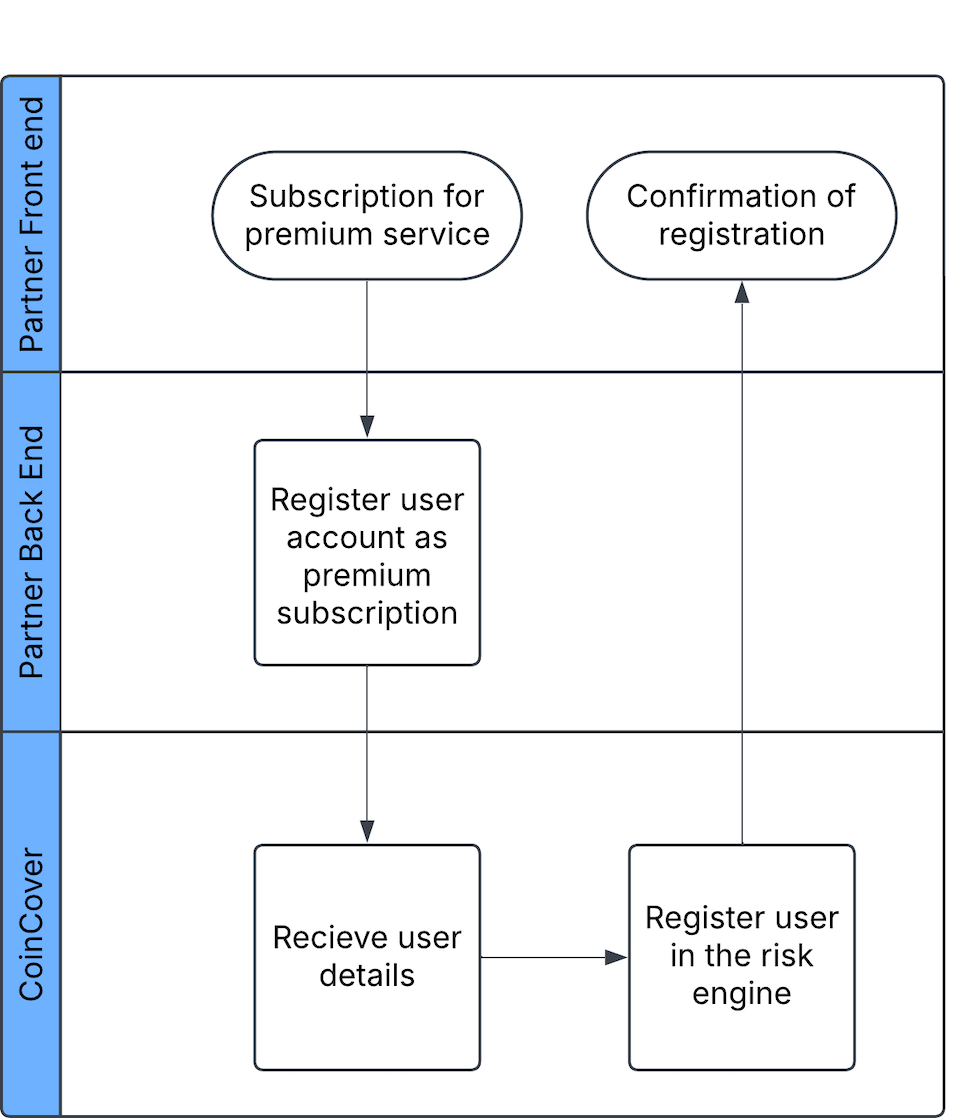
When a user signs up for the subscription service CoinCover will need this user to be registered in the CoinCover risk engine using the '/user' endpoint link here.
Step 2: Integrate Transaction Check endpoint
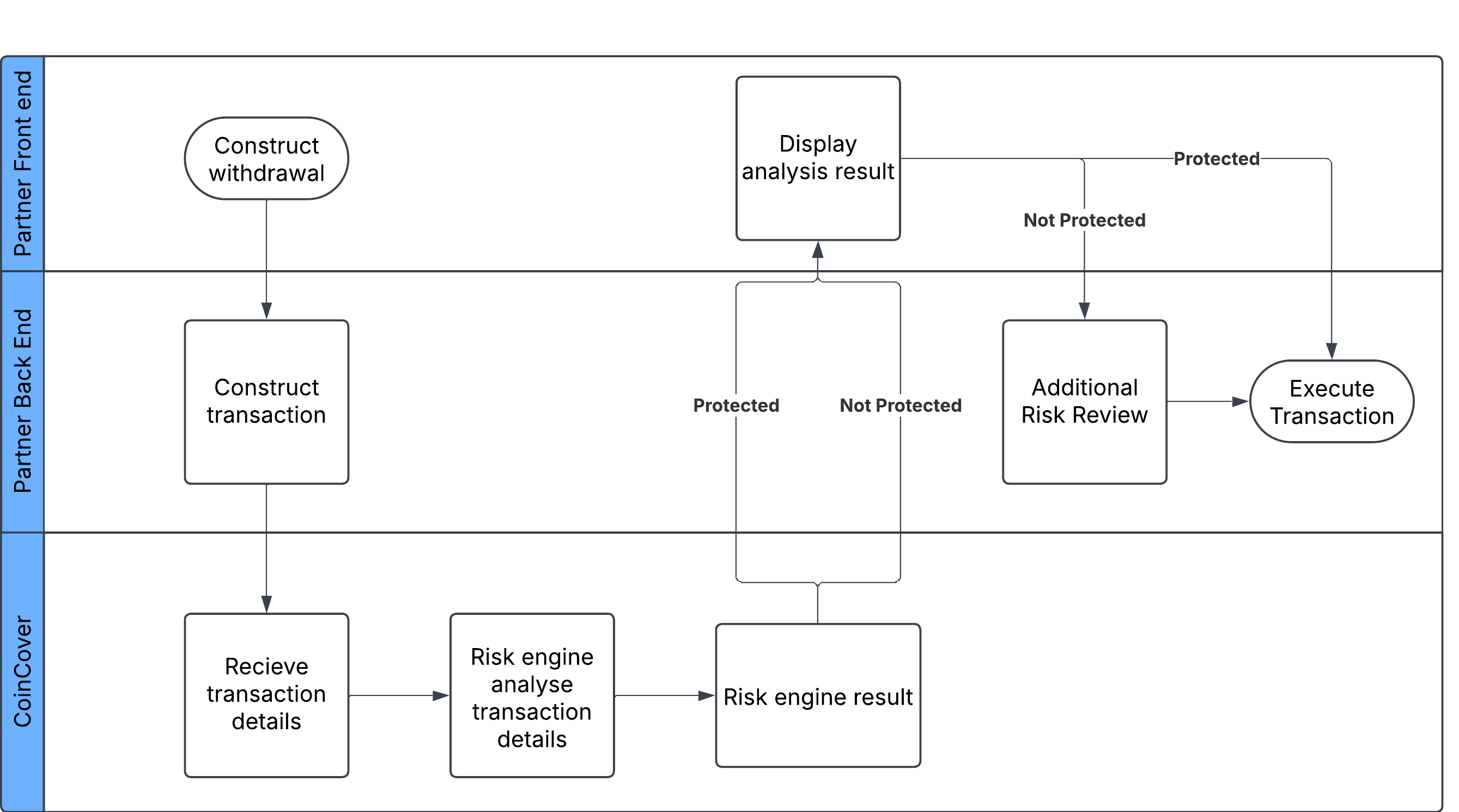
After a sign up user on your platform creates a transaction, you will send the necessary data to the ‘/Transaction’ API endpoint (link here). This returns either a Green (Protected) or Red (Not Protected) status for that specific transaction.
Green: Provide the user with the option to purchase Protection.
Red: We recommend advising the customer and carrying out an additional risk review.
API Reference
Our comprehensive API references and guides enable you to thoroughly explore our products and features, ensuring you can integrate with us as quickly as possible.
The integration guides offer step-by-step instructions for our most common use cases. If you’d like to test the integration, please contact your Sales Representative, who can provide you with a bearer token for our test environment.
POST Check Transaction
{{HOST}}/transactionTransactions should be sent to CoinCover before they are published or broadcast to the blockchain.
CoinCover requires core elements of a blockchain transaction including the transaction Hash which allows CoinCover to reconcile this for any published transactions. Transactions need to be associated to a wallet and an end-user.
The coin/token type needs to be defined in the API call. Please find in this link the tokens that CoinCover supports:
https://www.coincover.com/knowledge-hub/assets-we-protect
Threat Detected Codes
| Code | Category | Reason |
|---|---|---|
50101 |
Sanctioned address |
The destination wallet address is associated with an untrustworthy or high-risk jurisdiction. |
50102 |
Scamming address |
The destination wallet address has previously been associated with reported scam. |
50103 |
Phishing address |
The destination wallet address has previously been associated with reported phishing activities |
50104 |
Previous claim |
The destination wallet address has previously been associated with a previous claim incident. |
50105 |
Honeypot token |
The destination wallet address has previously been associated with honeypot tokens or has created scam tokens. |
50106 |
Blackmail activities |
The destination wallet address has previously been associated with blackmail activities. |
50107 |
Stealing attack |
The destination wallet address has previously been associated with a reported stealing attack. |
50108 |
Fake KYC |
The destination wallet address has previously been involved with faking KYC requirements. |
50109 |
Malicious mining activities |
The destination wallet address has previously been involved with malicious mining activities. |
50110 |
Darkweb transactions |
The destination wallet address has previously been involved with darkweb transactions. |
50111 |
Cybercrime |
The destination wallet address has previously been involved with cybercrime activities. |
50112 |
Money laundering |
The destination wallet address has previously been involved with money laundering activities. |
50113 |
Financial crime |
The destination wallet address has previously been involved with financial crime activities. |
50114 |
Sextortion |
The destination wallet address has previously been involved with sextortion activities. |
50115 |
Ransomware |
The destination wallet address has previously been involved with ransomware attacks. |
50201 |
Associated with blocklist wallet |
The destination wallet address has previously transacted with known blocklisted addresses. |
50202 |
Suspected malicious address |
The destination wallet address is suspected to be involved with malicious behaviour. |
50301 |
User upper amount hourly limit |
The transaction amount breaches the user’s maximum amount per hour limit policy. |
50302 |
User upper amount daily limit |
The transaction amount breaches the user’s maximum amount per day limit policy. |
50303 |
Organisation transaction upper amount limit |
The transaction amount breaches the maximum amount per transaction limit policy. |
50304 |
Wallet hourly upper amount limit |
The transaction amount breaches the maximum amount per hour for this wallet. |
50305 |
Wallet daily upper amount limit |
The transaction amount breaches the maximum amount per day for this wallet. |
50306 |
Organisation hourly upper amount limit |
The transaction amount breaches the maximum amount per hour for your organisation. |
50307 |
Organisation daily upper amount limit |
The transaction amount breaches the maximum amount per day for your organisation. |
50308 |
Organisation transactions limit (per user) |
The transaction breaches the maximum number of transactions allowed per day for your organisation. |
50310 |
User transaction upper amount limit |
This transaction amount breaches the maximum claim limit amount for this user. |
50401 |
User upper limit |
This transaction amount breaches CoinCover’s user limit policy. |
50402 |
Transaction amount daily limit |
This transaction amount breaches CoinCover’s daily limit policy. |
50403 |
Transaction upper amount limit |
The transaction amount breaches CoinCover’s maximum amount per transaction limit. |
50501 |
Anomalous daily transaction |
This transaction has been determined as being suspicious in conjunction with the daily pattern. |
50502 |
Anomalous weekly transaction |
This transaction has been determined as being suspicious in conjunction with the weekly pattern. |
50503 |
Anomalous monthly transaction |
This transaction has been determined as being suspicious in conjunction with the monthly pattern. |
50504 |
Anomalous quarterly transaction |
This transaction has been determined as being suspicious in conjunction with the quarterly pattern. |
50505 |
Anomalous yearly transaction |
This transaction has been determined as being suspicious in conjunction with the yearly pattern. |
50601 |
Transaction is in a time window with abnormal volume |
This transaction has been determined as being suspicious in conjunction with time of day. |
50602 |
Transaction is in a time window with abnormal volume |
This transaction has been determined as being suspicious in conjunction weekly behaviour. |
50603 |
Transaction is in a time window with abnormal volume |
This transaction has been determined as being suspicious in conjunction monthly behaviour. |
50701 |
Token not supported by CoinCover |
This transaction contains a token that is not protected by CoinCover. |
Field Information
| Field | Description | Mandatory |
|---|---|---|
transactionCustomerId |
Unique internal ID used by customers systems to identify a transaction. |
Yes |
transactionHash |
Hash of the transaction, verifiable on chain if published. |
No |
coin |
Name of coin/token as defined in coingecko. Use name and not code. E.g bitcoin not btc as codes are not unique. |
Yes |
walletId |
walletId associated to the user. Where there is an onchain reference available, this should be used. |
Yes |
outputs |
Array to support single or batch transactions. Each object in the array should consist of a destination address, amount and the associated user. |
Yes |
outputs: destination |
On chain destination address. |
Yes |
outputs: amount |
Amount in currency. E.g. 1.7 bitcoin. |
Yes |
outputs: userId |
User ID of the end-user relevant to the customers systems and associated to each output address. |
Yes |
HTTP Status Codes
| Code | Description |
|---|---|
200 |
OK. |
400 |
Missing mandatory field value or validation issues. |
401 |
Missing or invalid bearer token. |
HEADERS
Content-Type application/json
Authorization Bearer ${API_TOKEN}
Body raw
{
  "transactionCustomerId": "b27f38b9-5158-4b4b-ae2f-a030852f98cd",
  "transactionHash": "GL8636339870050078",
  "coin": "bitcoin-cash",
  "walletId": "1FjgpyeeWTRd7BxTXHEL2rjCj8",
  "outputs":[
      {
        "destination": "16bG5v7VkCeadwzyD1CqAvL6soJ3nfGAhh",
        "amount": "356",
        "userId": "27a73667-fb36-4708-822f-8b2c79cb817e"
      }
  ]
}
Example Request
cURL - cURL
curl --location '/transaction' \
--header 'Content-Type: application/json' \
--header 'Authorization: Bearer ${API_TOKEN}' \
--data '{
  "transactionCustomerId": "b27f38b9-5158-4b4b-ae2f-a030852f98cd",
  "transactionHash": "GL8636339870050078",
  "coin": "bitcoin-cash",
  "walletId": "1FjgpyeeWTRd7BxTXHEL2rjCj8",
  "outputs":[
    {
      "destination": "16bG5v7VkCeadwzyD1CqAvL6soJ3nfGAhh",
      "amount": "356",
      "userId": "27a73667-fb36-4708-822f-8b2c79cb817e"
    }
  ]
}'
C# - HttpClient
var client = new HttpClient();
var request = new HttpRequestMessage(HttpMethod.Post, "/transaction");
request.Headers.Add("Authorization", "Bearer ${API_TOKEN}");
var content = new StringContent("{\n  \"transactionCustomerId\": \"b27f38b9-5158-4b4b-ae2f-a030852f98cd\",\n  \"transactionHash\": \"GL8636339870050078\",\n  \"coin\": \"bitcoin-cash\",\n  \"walletId\": \"1FjgpyeeWTRd7BxTXHEL2rjCj8\",\n  \"outputs\":[\n     {\n       \"destination\": \"16bG5v7VkCeadwzyD1CqAvL6soJ3nfGAhh\",\n       \"amount\": \"356\",\n       \"userId\": \"27a73667-fb36-4708-822f-8b2c79cb817e\"\n     }\n   ]\n}", null, "application/json");
request.Content = content;
var response = await client.SendAsync(request);
response.EnsureSuccessStatusCode();
Console.WriteLine(await response.Content.ReadAsStringAsync());
Go - Native
package main

import (
  "fmt"
  "strings"
  "net/http"
  "io/ioutil"
)

func main() {

  url := "/transaction"
  method := "POST"

  payload := strings.NewReader(`{
  "transactionCustomerId": "b27f38b9-5158-4b4b-ae2f-a030852f98cd",
  "transactionHash": "GL8636339870050078",
  "coin": "bitcoin-cash",
  "walletId": "1FjgpyeeWTRd7BxTXHEL2rjCj8",
  "outputs":[
    {
      "destination": "16bG5v7VkCeadwzyD1CqAvL6soJ3nfGAhh",
      "amount": "356",
      "userId": "27a73667-fb36-4708-822f-8b2c79cb817e"
    }
  ]
  }`)

  client := &http.Client {
  }
  req, err := http.NewRequest(method, url, payload)

  if err != nil {
    fmt.Println(err)
    return
  }
  req.Header.Add("Content-Type", "application/json")
  req.Header.Add("Authorization", "Bearer ${API_TOKEN}")

  res, err := client.Do(req)
  if err != nil {
    fmt.Println(err)
    return
  }
  defer res.Body.Close()

  body, err := ioutil.ReadAll(res.Body)
  if err != nil {
    fmt.Println(err)
    return
  }
  fmt.Println(string(body))
}
JavaScript - Fetch
var myHeaders = new Headers();
myHeaders.append("Content-Type", "application/json");
myHeaders.append("Authorization", "Bearer ${API_TOKEN}");

var raw = JSON.stringify({
  "transactionCustomerId": "b27f38b9-5158-4b4b-ae2f-a030852f98cd",
  "transactionHash": "GL8636339870050078",
  "coin": "bitcoin-cash",
  "walletId": "1FjgpyeeWTRd7BxTXHEL2rjCj8",
  "outputs": [
    {
      "destination": "16bG5v7VkCeadwzyD1CqAvL6soJ3nfGAhh",
      "amount": "356",
      "userId": "27a73667-fb36-4708-822f-8b2c79cb817e"
    }
  ]
});

var requestOptions = {
  method: 'POST',
  headers: myHeaders,
  body: raw,
  redirect: 'follow'
};

fetch("/transaction", requestOptions)
  .then(response => response.text())
  .then(result => console.log(result))
  .catch(error => console.log('error', error));
Example Response
{
  "transactionUUID": "3d0ee9d3-4d85-5c8e-af77-3bc9feec83f2",
  "status": "GREEN",
  "message": "Transaction is protected by CoinCover."
}
POST Create new user
{{HOST}}/userCreate new user is used to create a new User Registration for an existing User within a partner’s systems. The User Id that is associated with user in the partner’s systems should be specified in the request body along with the relevant user details as stated in the Field Information table.
Field Information
| Field | Description | Mandatory |
|---|---|---|
|
User Id of the partner’s end-user relevant to the partners systems. |
Yes |
|
First name. |
Yes |
|
Last name. |
Yes |
|
Date of Birth. |
No |
|
Country of residence of end-user https://www.iso.org/obp/ui/#search for supported format. |
Yes |
|
Nationality of end-user https://www.iso.org/obp/ui/#search for supported format. |
No |
Response Codes
| Code | Description |
|---|---|
201 |
Created successfully. |
400 |
Missing mandatory field value or validation issues. |
401 |
Missing or invalid bearer token. |
HEADERS
Content-Type application/json
Authorization Bearer ${API_TOKEN}
Body raw (json)
{
    "userId": "jb001",
    "firstName": "Joe",
    "lastName": "Blogs",
    "dob": "1975-05-01",
    "residenceCountry": "US",
    "nationality": "US"
}
Example Request
cURL - cURL
curl --location 'https://api.txm.coincover.com/user' \
--header 'Content-Type: application/json' \
--header 'Authorization: Bearer ${API_TOKEN}' \
--data '{
    "userId": "jb001",
    "firstName": "Joe",
    "lastName": "Blogs",
    "dob": "1975-05-01",
    "residenceCountry": "US",
    "nationality": "US"
}'
C# - HttpClient
var client = new HttpClient();
var request = new HttpRequestMessage(HttpMethod.Post, "https://api.txm.coincover.com/user");
request.Headers.Add("Authorization", "Bearer ${API_TOKEN}");
var content = new StringContent("{\n    \"userId\": \"jb001\",\n    \"firstName\": \"Joe\",\n    \"lastName\": \"Blogs\",\n    \"dob\": \"1975-05-01\",\n    \"residenceCountry\": \"US\",\n    \"nationality\": \"US\"\n}", null, "application/json");
request.Content = content;
var response = await client.SendAsync(request);
response.EnsureSuccessStatusCode();
Console.WriteLine(await response.Content.ReadAsStringAsync());
Go - Native
package main

import (
  "fmt"
  "strings"
  "net/http"
  "io/ioutil"
)

func main() {

  url := "https://api.txm.coincover.com/user"
  method := "POST"

  payload := strings.NewReader(`{
    "userId": "jb001",
    "firstName": "Joe",
    "lastName": "Blogs",
    "dob": "1975-05-01",
    "residenceCountry": "US",
    "nationality": "US"
  }`)

  client := &http.Client {
  }
  req, err := http.NewRequest(method, url, payload)

  if err != nil {
    fmt.Println(err)
    return
  }
  req.Header.Add("Content-Type", "application/json")
  req.Header.Add("Authorization", "Bearer ${API_TOKEN}")

  res, err := client.Do(req)
  if err != nil {
    fmt.Println(err)
    return
  }
  defer res.Body.Close()

  body, err := ioutil.ReadAll(res.Body)
  if err != nil {
    fmt.Println(err)
    return
  }
  fmt.Println(string(body))
}
JavaScript - Fetch
var myHeaders = new Headers();
myHeaders.append("Content-Type", "application/json");
myHeaders.append("Authorization", "Bearer ${API_TOKEN}");

var raw = JSON.stringify({
  "userId": "jb001",
  "firstName": "Joe",
  "lastName": "Blogs",
  "dob": "1975-05-01",
  "residenceCountry": "US",
  "nationality": "US"
});

var requestOptions = {
  method: 'POST',
  headers: myHeaders,
  body: raw,
  redirect: 'follow'
};

fetch("https://api.txm.coincover.com/user", requestOptions)
  .then(response => response.text())
  .then(result => console.log(result))
  .catch(error => console.log('error', error));
Example Response
            No response body
This request doesn't return any response body
PATCH Update Existing User
{{HOST}}/user/${userId}Field Information
| Field | Description | Mandatory |
|---|---|---|
|
First name. |
No |
|
Last name. |
No |
|
Country of residence of end-user https://www.iso.org/obp/ui/#search for supported format. |
No |
|
Date of Birth. |
No |
Response Codes
| Code | Description |
|---|---|
204 |
Successfully updated. |
400 |
Missing mandatory field value or validation issues. |
401 |
Missing or invalid bearer token. |
404 |
User with the specified id does not exist. |
HEADERS
Content-Type application/json
Authorization Bearer ${API_TOKEN}
Body raw
{
    "firstName": "Joe",
    "lastName": "Blogs",
    "residenceCountry": "US"
}
Example Request
cURL - cURL
curl --location --request PATCH 'https://api.txm.coincover.com/user/jb001' \
--header 'Content-Type: application/json' \
--header 'Authorization: Bearer ${API_TOKEN}' \
--data '{
    "firstName": "Joe",
    "lastName": "Blogs",
    "residenceCountry": "US"
}'
C# - HttpClient
var client = new HttpClient();
var request = new HttpRequestMessage(HttpMethod.Patch, "https://api.txm.coincover.com/user/jb001");
request.Headers.Add("Authorization", "Bearer ${API_TOKEN}");
var content = new StringContent("{\n    \"firstName\": \"Joe\",\n    \"lastName\": \"Blogs\",\n    \"residenceCountry\": \"US\"\n}", null, "application/json");
request.Content = content;
var response = await client.SendAsync(request);
response.EnsureSuccessStatusCode();
Console.WriteLine(await response.Content.ReadAsStringAsync());
Go - Native
package main

import (
  "fmt"
  "strings"
  "net/http"
  "io/ioutil"
)

func main() {

  url := "https://api.txm.coincover.com/user/jb001"
  method := "PATCH"

  payload := strings.NewReader(`{
    "firstName": "Joe",
    "lastName": "Blogs",
    "residenceCountry": "US"
  }`)

  client := &http.Client {
  }
  req, err := http.NewRequest(method, url, payload)

  if err != nil {
    fmt.Println(err)
    return
  }
  req.Header.Add("Content-Type", "application/json")
  req.Header.Add("Authorization", "Bearer ${API_TOKEN}")

  res, err := client.Do(req)
  if err != nil {
    fmt.Println(err)
    return
  }
  defer res.Body.Close()

  body, err := ioutil.ReadAll(res.Body)
  if err != nil {
    fmt.Println(err)
    return
  }
  fmt.Println(string(body))
}
JavaScript - Fetch
  var myHeaders = new Headers();
myHeaders.append("Content-Type", "application/json");
myHeaders.append("Authorization", "Bearer ${API_TOKEN}");

var raw = JSON.stringify({
  "firstName": "Joe",
  "lastName": "Blogs",
  "residenceCountry": "US"
});

var requestOptions = {
  method: 'PATCH',
  headers: myHeaders,
  body: raw,
  redirect: 'follow'
};

fetch("https://api.txm.coincover.com/user/jb001", requestOptions)
  .then(response => response.text())
  .then(result => console.log(result))
  .catch(error => console.log('error', error));
Example Response
            No response body
This request doesn't return any response body
POST Create user plan
{{HOST}}/user/${userId}/planField Information
| Field | Description | Mandatory |
|---|---|---|
|
USD level of cover. |
Yes |
Response Codes
| Code | Description |
|---|---|
201 |
Created successfully. |
400 |
Missing mandatory field value or validation issues. |
401 |
Missing or invalid bearer token. |
404 |
User with the specified id does not exist. |
HEADERS
Content-Type application/json
Authorization Bearer ${API_TOKEN}
Body raw (json)
{
    "levelUsd": 1000
}
Example Request
cURL - cURL
curl --location 'https://api.txm.coincover.com/user/jb001/plan' \
--header 'Content-Type: application/json' \
--header 'Authorization: Bearer ${API_TOKEN}' \
--data '{
    "levelUsd": 1000
}'
C# - HttpClient
var client = new HttpClient();
var request = new HttpRequestMessage(HttpMethod.Post, "https://api.txm.coincover.com/user/jb001/plan");
request.Headers.Add("Authorization", "Bearer ${API_TOKEN}");
var content = new StringContent("{\n    \"levelUsd\": 1000\n}", null, "application/json");
request.Content = content;
var response = await client.SendAsync(request);
response.EnsureSuccessStatusCode();
Console.WriteLine(await response.Content.ReadAsStringAsync());
Go - Native
package main

import (
  "fmt"
  "strings"
  "net/http"
  "io/ioutil"
)

func main() {

  url := "https://api.txm.coincover.com/user/jb001/plan"
  method := "POST"

  payload := strings.NewReader(`{
    "levelUsd": 1000
  }`)

  client := &http.Client {
  }
  req, err := http.NewRequest(method, url, payload)

  if err != nil {
    fmt.Println(err)
    return
  }
  req.Header.Add("Content-Type", "application/json")
  req.Header.Add("Authorization", "Bearer ${API_TOKEN}")

  res, err := client.Do(req)
  if err != nil {
    fmt.Println(err)
    return
  }
  defer res.Body.Close()

  body, err := ioutil.ReadAll(res.Body)
  if err != nil {
    fmt.Println(err)
    return
  }
  fmt.Println(string(body))
}
JavaScript - Fetch
var myHeaders = new Headers();
myHeaders.append("Content-Type", "application/json");
myHeaders.append("Authorization", "Bearer ${API_TOKEN}");

var raw = JSON.stringify({
  "levelUsd": 1000
});

var requestOptions = {
  method: 'POST',
  headers: myHeaders,
  body: raw,
  redirect: 'follow'
};

fetch("https://api.txm.coincover.com/user/jb001/plan", requestOptions)
  .then(response => response.text())
  .then(result => console.log(result))
  .catch(error => console.log('error', error));
Example Response
            No response body
This request doesn't return any response body
PATCH Update user plan
{{HOST}}/user/${userId}/planField Information
| Field | Description | Mandatory |
|---|---|---|
|
USD level of cover. |
No |
Response Codes
| Code | Description |
|---|---|
201 |
Created successfully. |
400 |
Missing mandatory field value or validation issues. |
401 |
Missing or invalid bearer token. |
404 |
User with the specified id does not exist. |
HEADERS
Content-Type application/json
Authorization Bearer ${API_TOKEN}
Body raw (json)
{
    "levelUsd": 500
}
Example Request
cURL - cURL
curl --location --request PATCH 'https://api.txm.coincover.com/user/jb001/plan' \
--header 'Content-Type: application/json' \
--header 'Authorization: Bearer ${API_TOKEN}' \
--data '{
    "levelUsd": 500
}'
C# - HttpClient
var client = new HttpClient();
var request = new HttpRequestMessage(HttpMethod.Patch, "https://api.txm.coincover.com/user/jb001/plan");
request.Headers.Add("Authorization", "Bearer ${API_TOKEN}");
var content = new StringContent("{\n    \"levelUsd\": 500\n}", null, "application/json");
request.Content = content;
var response = await client.SendAsync(request);
response.EnsureSuccessStatusCode();
Console.WriteLine(await response.Content.ReadAsStringAsync());
Go - Native
package main

import (
  "fmt"
  "strings"
  "net/http"
  "io/ioutil"
)

func main() {

  url := "https://api.txm.coincover.com/user/jb001/plan"
  method := "PATCH"

  payload := strings.NewReader(`{
    "levelUsd": 500
  }`)

  client := &http.Client {
  }
  req, err := http.NewRequest(method, url, payload)

  if err != nil {
    fmt.Println(err)
    return
  }
  req.Header.Add("Content-Type", "application/json")
  req.Header.Add("Authorization", "Bearer ${API_TOKEN}")

  res, err := client.Do(req)
  if err != nil {
    fmt.Println(err)
    return
  }
  defer res.Body.Close()

  body, err := ioutil.ReadAll(res.Body)
  if err != nil {
    fmt.Println(err)
    return
  }
  fmt.Println(string(body))
}
JavaScript - Fetch
var myHeaders = new Headers();
myHeaders.append("Content-Type", "application/json");
myHeaders.append("Authorization", "Bearer ${API_TOKEN}");

var raw = JSON.stringify({
  "levelUsd": 500
});

var requestOptions = {
  method: 'PATCH',
  headers: myHeaders,
  body: raw,
  redirect: 'follow'
};

fetch("https://api.txm.coincover.com/user/jb001/plan", requestOptions)
  .then(response => response.text())
  .then(result => console.log(result))
  .catch(error => console.log('error', error));
Example Response
            No response body
This request doesn't return any response body